# Freedify - Music Streaming Web App
*Last updated: January 11, 2026*
Stream music and podcasts from anywhere. **Generate smart playlists with AI**, search songs, albums, artists, podcasts or paste URLs from Spotify, SoundCloud, Bandcamp, Archive.org, Phish.in, and more.
## ✨ Features
### 🎧 HiFi & Hi-Res Streaming
- **Lossless FLAC** - Direct 16-bit FLAC streaming from Tidal (HiFi)
- **Hi-Res Audio** - **24-bit/96kHz** support powered by **Dab Music** (Qobuz Proxy)
- **Hi-Res Mode Toggle** - Click the HiFi button to switch between:
- **Hi-Res Mode** (Cyan) - Prioritizes 24-bit lossless when available
- **HiFi Mode** (Green) - Standard 16-bit lossless streaming
- **HI-RES Album Badge** - Cyan "HI-RES" sticker on album cards indicates 24-bit availability
- **Audio Quality Display** - Album modal shows actual bit depth (e.g., "24bit / 96kHz")
- **Direct Stream** - No more MP3 transcoding! Fast, pure lossless audio.
- **Fast Playback** - Audio starts in ~5 seconds (streams progressively, no transcode wait)
- **Format Indicator** - Badge next to artist shows FLAC (green/cyan), AAC (green), or MP3 (grey)
- **EQ Compatible** - Full equalizer support even with lossless streams
- **Seek Support** - Instant seeking/skipping even while streaming Hi-Res
- **Gapless Playback** - Seamless music transitions (default) with optional 1-second crossfade
- **Music Discovery** - Click Artist name to search or Album name to view full tracklist instantly
### 🧠 AI & Smart Features - Needs Gemini API Key to work
- **Smart Playlist Generator** - Create custom playlists instantly by describing a vibe, genre, or activity.
- **AI Radio** - Infinite queue recommendations based on your seed track (prevents genre drift)
- **DJ Mode** - AI-powered mixing tips (transition technique, timing, key compatibility) - accuracy undetermined
- **Mix Analysis** - Learn how to mix compatible tracks by Key and BPM
### 🔍 Search
- **Deezer-powered** - Search tracks, albums, or artists with no rate limits
- **YouTube Music** - Search YT Music catalog via **More → YT Music**
- **Jamendo Fallback** - 600K+ independent/Creative Commons tracks (auto-fallback if main sources miss)
- **Live Show Search** - Search "Phish 2025" or "Grateful Dead 1977" to find live shows
- **Setlist.fm** - Search concert setlists via **More → Setlists**, auto-matches to audio sources
- Added Setlist Detail Modal to preview shows before listening
- **Podcast Search** - Search and stream podcasts via PodcastIndex API
- **Episode Details** - Click any episode to see full title, description, and publish date
- **Concert Search** - Find upcoming shows via **More → Concert Search** (Ticketmaster + SeatGeek)
- **URL Import** - Paste links from Spotify, Bandcamp, Soundcloud, Archive.org, Phish.in
### 🎵 Live Show Archives
- **Phish.in** - Search by year/month (e.g., Phish 2025 or Phish 2024/12)
- **Archive.org** - Grateful Dead, Billy Strings, Ween, King Gizzard
- **Direct URLs** - Paste any phish.in or archive.org show URL
### 🧠 ListenBrainz Integration
- **Scrobbling** - Automatically tracks what you listen to (triggers after 50% duration or 4 minutes)
- **Recommendations** - "For You" section (via **More → For You**) offers personalized tracks based on your history
- **Stats Dashboard** - See your total scrobbles and top artists this week in the For You section
- **Easy Setup** - Configure via `LISTENBRAINZ_TOKEN` environment variable
### 📝 Genius Lyrics
- **Lyrics Modal** - Press **L** or click 📝 in player controls to view lyrics
- **About Tab** - Song descriptions, release date, writers, and producers
- **Powered by Genius** - Searches and scrapes lyrics from Genius.com
- **Fullscreen Access** - Lyrics button available in fullscreen mode too
### 🎛️ Player Controls
- **Volume Control** - Slider + mute button (volume remembered between sessions)
- **Repeat Modes** - Off / Repeat All / Repeat One
- **Shuffle** - Shuffle playlist or current queue
- **Fullscreen Mode** - Click album art to expand
- **Mini Player** - Pop-out window for always-on-top playback control
- **Album Art Colors** - Player background tints to match the current album art
### 🖼️ Pop-out Mini Player
- **Always-on-Top** - Built with the latest Document Picture-in-Picture API to stay visible over other windows
- **Scrolling Marquee** - Animated artist and track names for long titles
- **Full Control** - Play, pause, skip, and volume adjustment directly from the mini window
- **Retro Aesthetic** - Winamp-inspired classic display for a nostalgic feel
- **Automatic Sync** - Seamlessly stays in sync with the main player state
### 🎬 Music Videos
- **Quick Access** - Press **V** or click 🎬 in fullscreen to find official music video
- **YouTube Search** - Opens YouTube with optimized search for official video
### 🌈 Audio Visualizer
- **Fullscreen Overlay** - Click 🌈 in "More" menu or `Alt+V`
- **MilkDrop Integration** - Powered by Butterchurn with hundreds of psychedelic presets
- **Next Preset** - Cycle through visuals with button or `N` key
- **Basic Modes** - Bars, Wave, Circular, and Particles
- **Audio-Reactive** - Responds to frequency data in real-time
### 💾 Download & Save
- **Save to Drive** - Direct save to Google Drive (FLAC/AIFF/MP3)
- **Single Tracks** - Download locally as Artist - Song.ext
- **Full Albums/Playlists** - Batch download as Artist - Album.zip
- **Multiple Formats** - FLAC (Hi-Res), WAV (16/24-bit), AIFF (16/24-bit), ALAC, 320kbps MP3
- **Current Track** - Press ⬇ on player bar or fullscreen to download now playing
- **MusicBrainz Metadata** - Downloads enriched with release year, label, and high-res cover art
### 📋 Queue Management
- **Drag to Reorder** - Drag tracks to rearrange
- **Add All / Shuffle All** - From any album or playlist
- **Smart Preloading** - Next track buffers automatically for gapless play
- **Auto-Queue** - Click any track in an album/playlist to queue and play all following tracks automatically
- **Queue Persistence** - Queue survives page refresh (saved to localStorage)
- **Volume Memory** - Volume level remembered between sessions
### Playlists
- **Add to Playlist** - Click the heart icon on any track to add it to a playlist
- **Create Playlists** - Create new playlists on the fly from the Add to Playlist modal
- **Playlists Tab** - Click **More → Playlists** to view all saved playlists
- **Delete Songs** - Remove individual songs from any playlist
- **Google Drive Sync** - Playlists sync to Google Drive for access across all your devices
- **Local Backup** - Also stored in browser localStorage (survives restarts)
- **Delete Playlists** - Hover over playlist and click 🗑️ to remove
### 🎛️ Equalizer
- **5-Band EQ** - Adjust 60Hz, 230Hz, 910Hz, 3.6kHz, 7.5kHz
- **Bass Boost** - Extra low-end punch
- **Volume Boost** - Up to +6dB gain
- **Presets** - Flat, Bass Boost, Treble, Vocal
### 🎨 Custom Themes
- **6 Color Themes** - Default, Purple, Blue, Green, Pink, Orange
- **Persistent** - Theme saved to localStorage
### ☁️ Google Drive Sync
- **Sync Modal** - Click ☁️ or press `Shift+S` to open the Drive Sync panel
- **Granular Control** - Choose to sync:
- **Everything** (Playlists + Queue)
- **Playlists Only** (keeps cloud queue unchanged)
- **Queue Only** (keeps cloud playlists unchanged)
- **Cross-Device Resume** - Start listening on one device, continue on another
- **Smart Merge** - Partial uploads preserve existing cloud data
- **Save Tracks** - Save audio directly to your "Freedify" folder
- **Privacy** - Uses Drive appDataFolder (hidden from Drive UI)
---
## 🔑 Google Cloud Setup (Required for Drive Sync & AI)
To enable **Google Drive Sync** and **AI features (Smart Playlist, AI Radio, DJ Mode)**, you need to set up a Google Cloud Project.
### Step 1: Create a Google Cloud Project
1. Go to [Google Cloud Console](https://console.cloud.google.com/)
2. Click the project dropdown (top-left) → **New Project**
3. Name it (e.g., "Freedify") → **Create**
4. Select your new project from the dropdown
### Step 2: Enable Required APIs
1. Go to **APIs & Services → Library**
2. Search for and **Enable** each of these:
- **Google Drive API** (for cloud sync)
- **Generative Language API** (for Gemini AI features)
### Step 3: Create OAuth 2.0 Credentials (for Drive Sign-In)
1. Go to **APIs & Services → Credentials**
2. Click **+ CREATE CREDENTIALS → OAuth client ID**
3. If prompted, configure the **OAuth consent screen**:
- Choose **External** (unless you're a Google Workspace user)
- Fill in App name, support email
- Add **Scopes**: `../auth/drive.appdata`, `../auth/drive.file`
- Add your email as a **Test User** (required during testing)
- Save and continue
4. Back in Credentials, create an **OAuth client ID**:
- Application type: **Web application**
- Name: "Freedify Web"
- **Authorized JavaScript origins**: Add your domains, e.g.:
- `http://localhost:8000` (for local dev)
- `https://your-app.up.railway.app` (for production)
- **Authorized redirect URIs**: (optional, not needed for implicit flow)
- Click **Create**
5. Copy your **Client ID** (looks like `123456789-abc.apps.googleusercontent.com`)
6. Set it as `GOOGLE_CLIENT_ID` environment variable
### Step 4: Create a Gemini API Key (for AI Features)
1. In Google Cloud Console, go to **APIs & Services → Credentials**
2. Click **+ CREATE CREDENTIALS → API key**
3. Copy the generated API key
4. (Optional) Click **Edit API key** to restrict it to "Generative Language API" only
5. Set it as `GEMINI_API_KEY` environment variable
### Environment Variables Summary
| Variable | Purpose |
|----------|---------|
| `GOOGLE_CLIENT_ID` | OAuth2 Client ID for Google Sign-In (Drive Sync) |
| `GEMINI_API_KEY` | API Key for Gemini AI (Smart Playlist, AI Radio, DJ Mode) |
> **Note:** For local development on `localhost`, you may see a "This app isn't verified" warning during sign-in. Click **Advanced → Go to Freedify (unsafe)** to proceed. For production, submit your app for verification in the OAuth consent screen settings.
### 📱 Mobile Ready
- **PWA Support** - Install on your phone's home screen
- **Responsive Design** - Works on any screen size
- **320kbps MP3** - High quality streaming
- **Lock Screen Controls** - Play/pause/skip from lock screen
---
### ⌨️ Keyboard Shortcuts
| Key | Action |
|-----|--------|
| Space | Play/Pause |
| ← / → | Previous/Next track |
| Shift+← / Shift+→ | Seek -/+ 10 seconds |
| ↑ / ↓ | Volume up/down |
| M | Mute/Unmute |
| S | Shuffle queue |
| R | Cycle repeat mode |
| F | Toggle fullscreen |
| Q | Toggle queue |
| E | Toggle EQ |
| P | Add to Playlist (Global) / Prev Preset (Visualizer) |
| H | Toggle HiFi/Hi-Res |
| D | Download current track |
| A | Toggle AI Radio |
| L | Open Lyrics |
| V | Find Music Video |
| Shift+V | Toggle Visualizer |
| N | Next Preset (Visualizer) |
| ESC | Exit Visualizer |
| Shift+S | Sync to Drive |
| ? | Show shortcuts help |
---
## 🚀 Quick Start
```bash
# Install dependencies
pip install -r app/requirements.txt
# Install FFmpeg (required)
# Windows: winget install ffmpeg
# macOS: brew install ffmpeg
# Linux: apt install ffmpeg
# Run the server
python -m uvicorn app.main:app --port 8000
```
Open http://localhost:8000
---
## 🌐 Deploy to Railway (Recommended for Hi-Res)
**Railway is recommended** for full Hi-Res (24-bit) support. Render blocks Dab Music API requests.
1. Go to [railway.app](https://railway.app) → New Project
2. Deploy from GitHub repo
3. Add environment variables (see below)
4. Go to Settings → Networking → Generate Domain
5. Your app will be live at `your-app.up.railway.app`
> **Pricing:** Railway offers a 30-day trial with $5 credit. After that, the Hobby plan is **$5/month**. If you want free hosting (with 16-bit FLAC only), use Render instead.
---
## 🌐 Deploy to Render (16-bit only)
Render works but **Hi-Res (24-bit) streaming is not available** due to IP restrictions on Dab Music API. You'll still get 16-bit FLAC from Tidal.
1. Fork/push this repo to GitHub
2. Go to render.com → New Web Service
3. Connect your GitHub repo
4. Render auto-detects render.yaml
5. Click Deploy
---
## ⚙️ Environment Variables (Deployment Secrets)
When deploying to Render (or other hosts), set these in your Dashboard:
| Variable | Required? | Description |
|----------|-----------|-------------|
| `GEMINI_API_KEY` | **YES** | Required for AI Radio and DJ Tips |
| `DAB_SESSION` | **YES** (for Hi-Res) | Dab Music session token for 24-bit streaming |
| `DAB_VISITOR_ID` | **YES** (for Hi-Res) | Dab Music visitor ID |
| `MP3_BITRATE` | No | Default: 320k |
| `PORT` | No | Default: 8000 |
### Optional Spotify Credentials (for high traffic)
If you hit rate limits, you can add your own keys:
| Variable | Description |
|----------|-------------|
| `SPOTIFY_CLIENT_ID` | Your App Client ID |
| `SPOTIFY_CLIENT_SECRET` | Your App Client Secret |
| `SPOTIFY_SP_DC` | Cookie for authenticated web player access |
| `PODCASTINDEX_KEY` | For Podcast Search (better results) |
| `PODCASTINDEX_SECRET` | For Podcast Search (required if KEY is used) |
| `SETLIST_FM_API_KEY` | For Setlist.fm concert search (free at setlist.fm/settings/api) |
| `LISTENBRAINZ_TOKEN` | For Scrobbling & Recommendations (get at listenbrainz.org/settings) |
| `GOOGLE_CLIENT_ID` | For Google Drive sync (get at console.cloud.google.com) |
| `JAMENDO_CLIENT_ID` | For Jamendo indie music fallback (get at developer.jamendo.com) |
| `GENIUS_ACCESS_TOKEN` | For Genius lyrics (get at genius.com/api-clients) |
| `TICKETMASTER_API_KEY` | For Concert Search (free at developer.ticketmaster.com) |
| `SEATGEEK_CLIENT_ID` | For Concert Search fallback (free at seatgeek.com/account/develop) |
| `DAB_SESSION` | **Recommended** - For Hi-Res (24-bit) Audio (from Dab/Qobuz) |
| `DAB_VISITOR_ID` | **Recommended** - For Hi-Res (24-bit) Audio (from Dab/Qobuz) |
---
## Live Show Search Examples:
- `Phish 2025` - All 2025 Phish shows
- `Phish 2024/12` - December 2024 shows
- `Grateful Dead 1977` - 1977 Dead from Archive.org
- `KGLW 2025` - 2025 King Gizzard & the Wizard Lizard shows
---
## Setlist.fm Search Examples:
Select **More → Setlists** and search using these formats:
- `Phish 31-12-2025` - Specific date (DD-MM-YYYY format)
- `Phish 2025-12-31` - Specific date (YYYY-MM-DD format)
- `Phish December 31 2025` - Natural language date
- `Pearl Jam 2024` - All shows from a year
Click a result to see the full setlist with song annotations, then click "Listen on Phish.in" or "Search on Archive.org" to play the show.
---
## Supported URL Sources:
- Spotify (playlists, albums, tracks)
- Bandcamp
- Soundcloud
- YouTube
- Archive.org
- Phish.in
- And 1000+ more via yt-dlp
---
## 📸 Screenshots

Search albums with Hi-Res badges — stream in 24-bit lossless quality from Qobuz

Album view with format info, track listing, and one-click download as ZIP
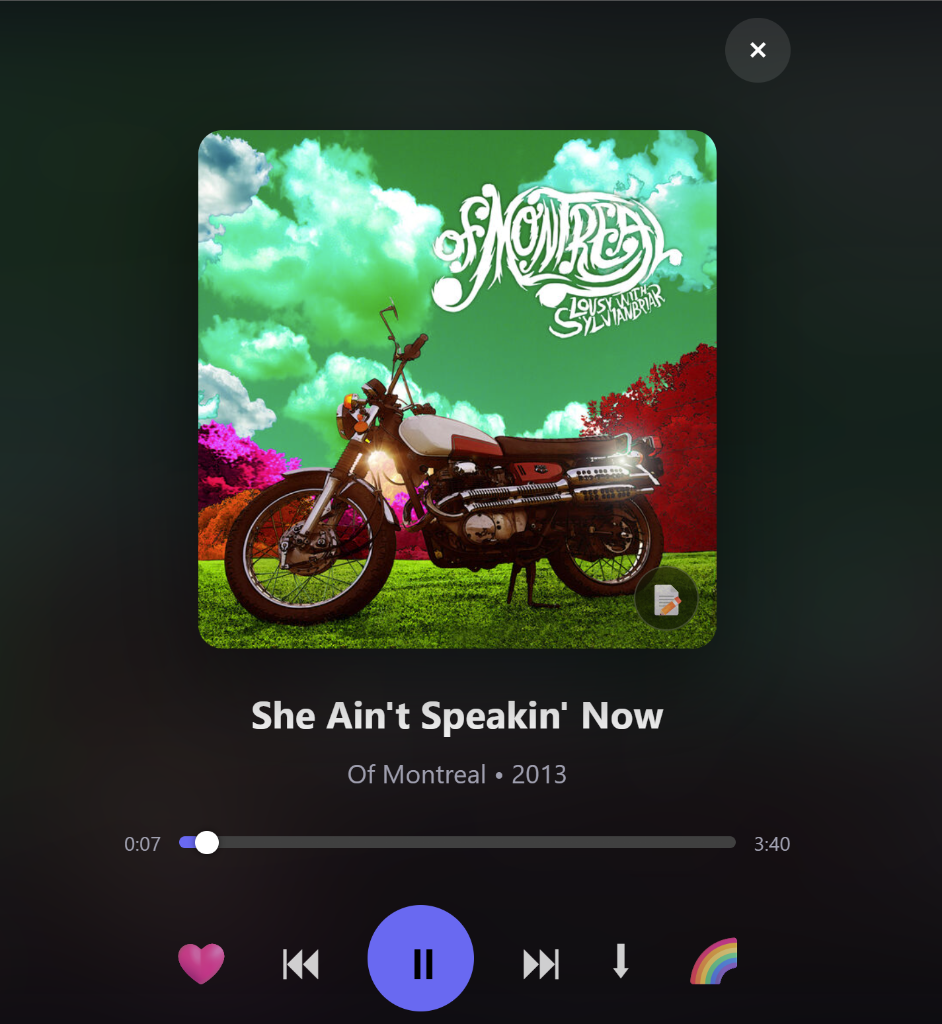
Immersive fullscreen mode with album art, playback controls, and visualizer toggle

Smart format selection — options adapt based on source quality (lossy, 16-bit, or 24-bit Hi-Res)
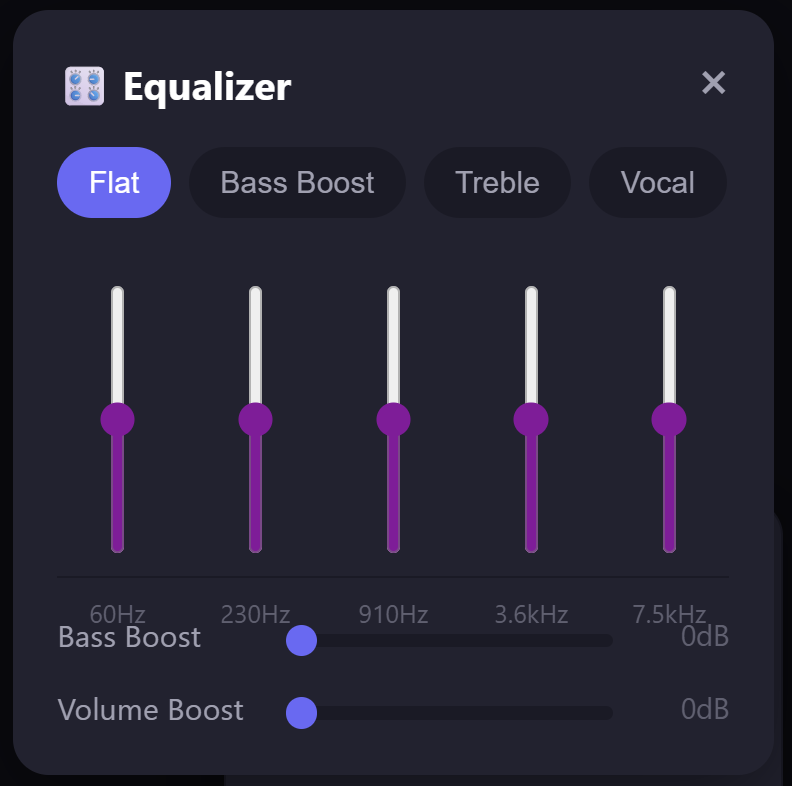
5-band EQ with presets (Flat, Bass Boost, Treble, Vocal) plus bass and volume boost

Full lyrics with verse/chorus sections synced from Genius
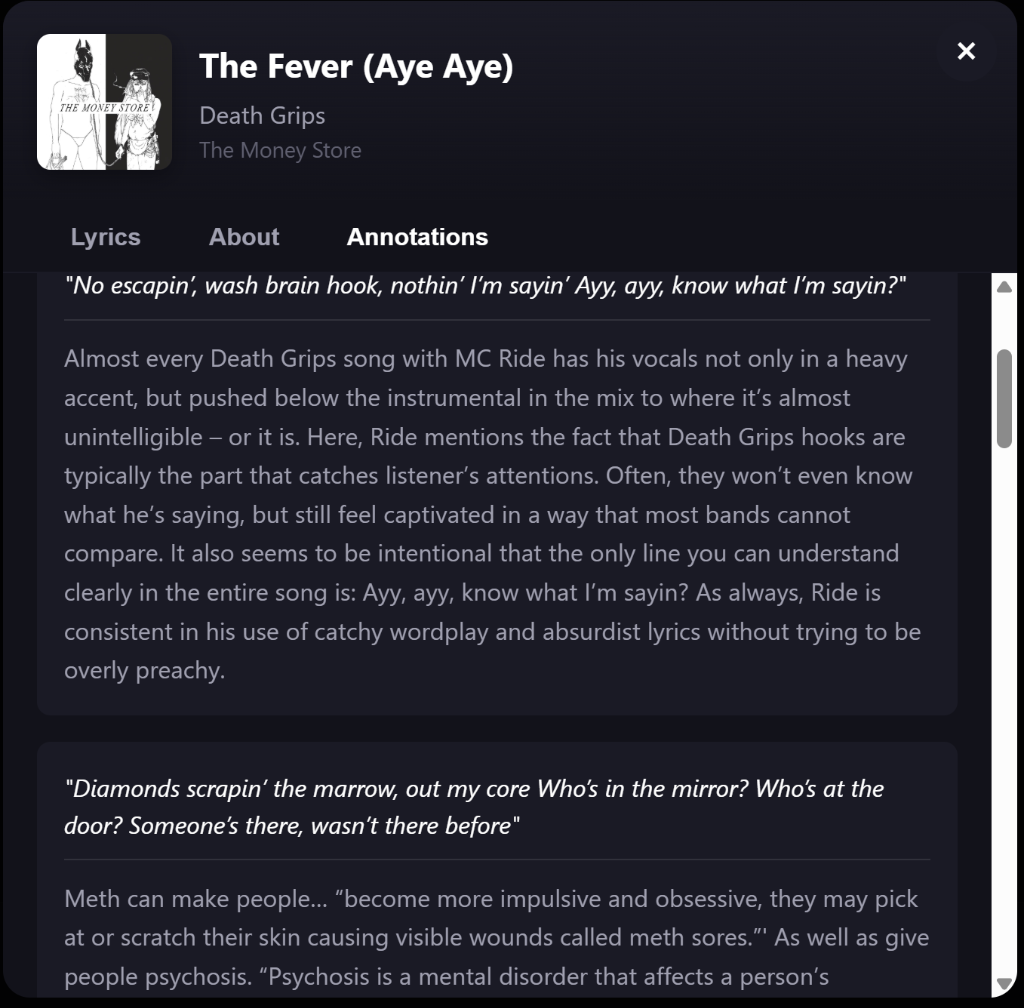
Genius annotations explaining song meanings and references

Podcast support with episode details, show notes, and streaming playback
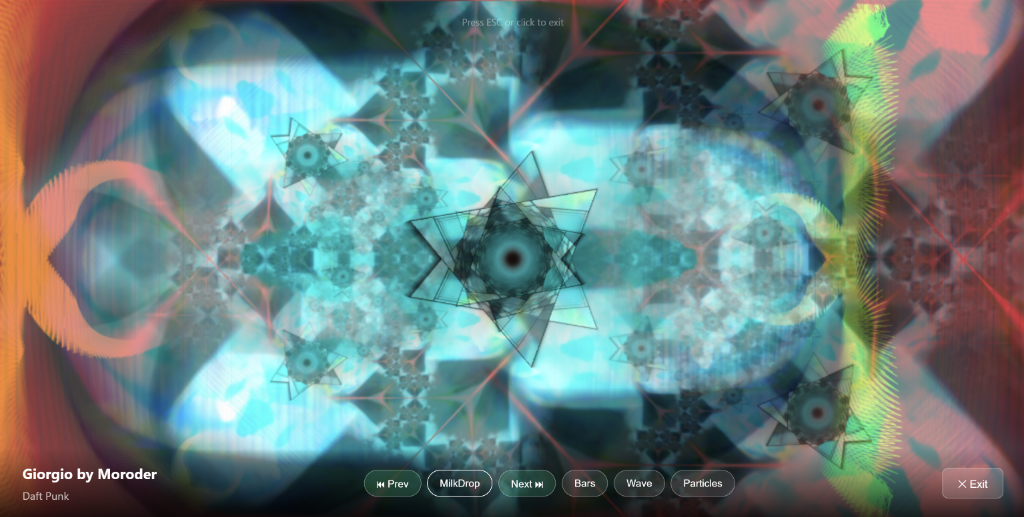
MilkDrop visualizer powered by Butterchurn — hundreds of audio-reactive presets

Switch between MilkDrop, Bars, Wave, and Particles modes with keyboard shortcuts
---
## Credits
Inspired by and built off of [Spotiflac](https://github.com/afkarxyz/Spotiflac) by afkarxyz.
**Hi-Res Audio Source** provided by [Dab Music](https://dabmusic.xyz).
---
Made with 💖 by a music lover, for music lovers.