
15 KiB
🚧 The bb-pi orchestrator is under construction — help us build it! Use your own coding agent alongside BeadBoard for now. 🚧
BeadBoard


Multi-agent orchestration and communication system built on Beads.
Agents claim tasks, send structured mail to each other, track dependencies, and close work with evidence. BeadBoard is the coordination layer — a dashboard that shows it all happening live, a CLI (bb) that hosts the orchestrator and manages agent communication, and a built-in execution runtime (bb-pi) that can spawn and manage agent workers directly.
Built on Beads and inspired by Gastown.
🚀 Add BeadBoard to Your Agent
npx skills add zenchantlive/beadboard --skill beadboard-driver
This installs the beadboard-driver skill — a 9-step operating contract that gives your agent:
- 📋 Task coordination through dependency-constrained graphs
- 💬 Structured agent-to-agent messaging (
HANDOFF,BLOCKED,DECISION,INFO) - 🔒 Scope-based work reservations with liveness-aware conflict resolution
- 📡 Realtime progress tracking via heartbeats and activity streams
- ✅ Evidence-required workflow — agents can't close work without verification gates
Or just tell your agent:
Install Beadboard, and the beadboard-driver skill from https://github.com/zenchantlive/beadboard and use it to coordinate your work. Run
npx skills add zenchantlive/beadboard --skill beadboard-driverthen follow the SKILL.md runbook.
Then add to your project's AGENTS.md or CLAUDE.md:
## BeadBoard

You have access to the **beadboard-driver** skill.

- Always use beadboard-driver as your entrypoint for coordination work (tasks, context, status)
  instead of inventing your own workflow.
- Use it to read and update Beads via `bd`, keep work state consistent with the BeadBoard UI,
  and obey the verification rules described in this repo.
- When in doubt about what to do next or how to record progress, call beadboard-driver and
  follow its guidance rather than editing markdown ad hoc.
See skills/beadboard-driver/SKILL.md for the complete agent runbook.
📦 Installation
Prerequisites
- Node.js 18.18+ (Node 20 LTS recommended)
- npm 7.0+
- Dolt (recommended — see Dolt section)
Install from Source
git clone https://github.com/zenchantlive/beadboard.git
cd beadboard
npm install
npm install -g .
This installs:
beadboard/bb— BeadBoard CLI: dashboard, orchestrator host, agent communication commandsbd— Beads CLI for task management (also available standalone:npm install -g @beads/bd)
beadboard --version
bd --version
Alternative: POSIX install script (Linux/macOS):
bash ./install/install.sh # installs bb + beadboard shims to ~/.beadboard/bin
⚡ Quick Start
cd ~/my-project
bd init                        # initialize Beads in your project
beadboard start --dolt         # start the dashboard with Dolt (recommended)
Open http://localhost:3000.
bd create --title "My first task" --type task --priority 0
🗄️ Dolt
BeadBoard uses Dolt — a version-controlled SQL database — as its primary backend. Dolt gives you:
- Full version history of every issue state change
- SQL queries across all your issues and projects
bd dolt pull/bd dolt pushfor multi-agent sync across machines- Branch-based workflows
# macOS
brew install dolt

# Linux / Windows
curl -L https://github.com/dolthub/dolt/releases/latest/download/install.sh | bash
Without Dolt, BeadBoard falls back to reading .beads/issues.jsonl directly. This is enough to poke around, but you'll want Dolt for real work.
🔧 What BeadBoard Does
BeadBoard is three things:
The Dashboard
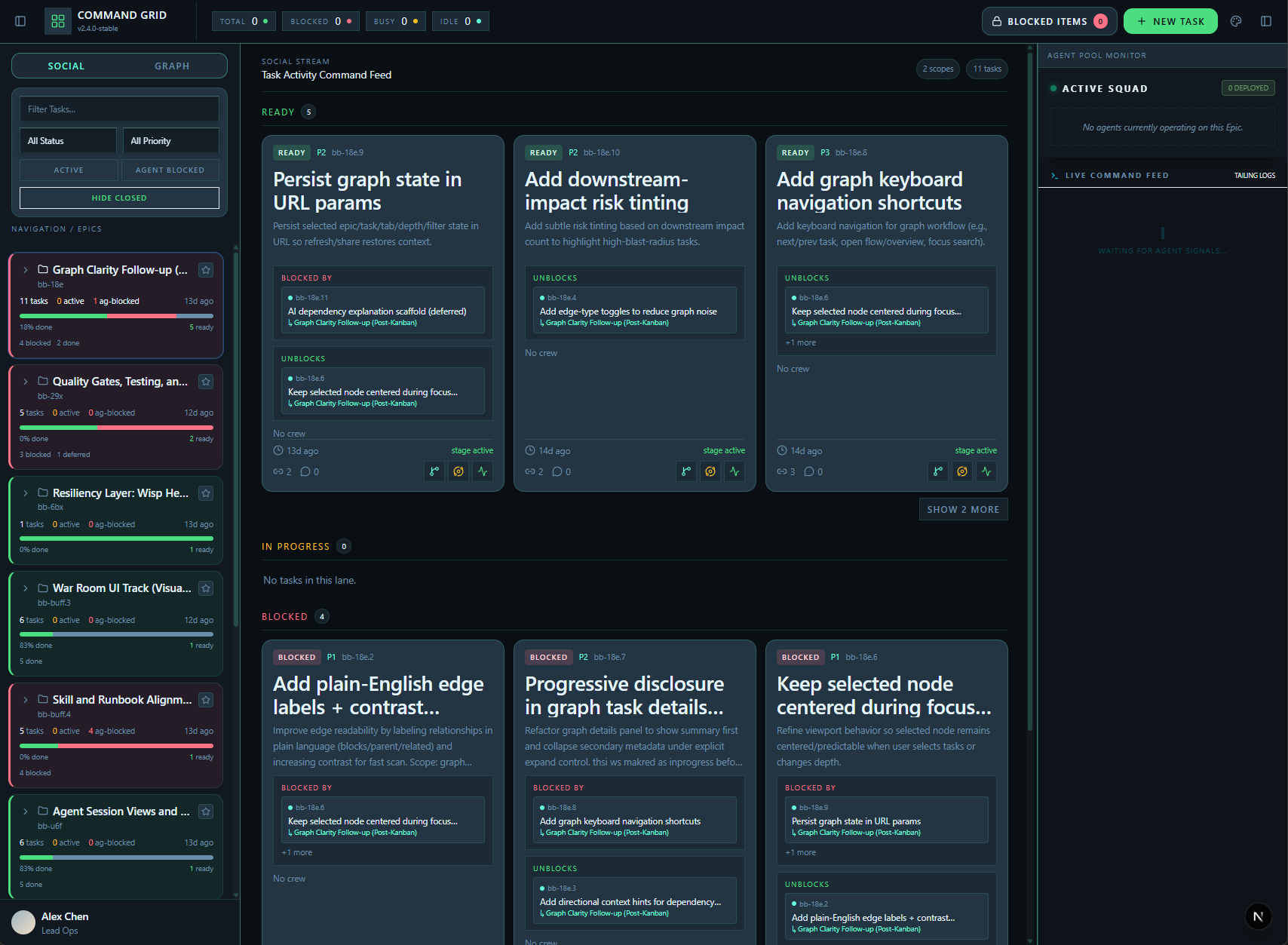
A live operations console with Social, Graph, and Activity views — updating in realtime via SSE as agents work.
The CLI (bb)
A full agent command center — not just a dashboard launcher:
# Agent lifecycle
bb agent register --name <id> --role <role>
bb agent list
bb agent activity-lease --agent <id>

# Agent-to-agent communication
bb agent send --from <id> --to <id> --bead <id> --category HANDOFF --subject "..."
bb agent inbox --agent <id>
bb agent ack --agent <id> --message <msg-id>

# Work reservations
bb agent reserve --agent <id> --scope <scope> --bead <id>
bb agent release --agent <id> --scope <scope>

# Orchestrator runtime
bb daemon start
bb daemon tui                    # interactive orchestrator REPL
bb daemon bootstrap              # install Pi runtime
The Orchestrator (bb-pi)
A built-in execution runtime that spawns and manages typed worker agents.
🧩 Core Features
💬 Agent Communication System
Structured message lifecycle for inter-agent coordination:
- Message categories:
HANDOFF,BLOCKED,DECISION,INFO - Required acknowledgment for high-signal categories (
HANDOFF,BLOCKED) - Broadcast & role-based routing — send to all agents or by role (
role:tester) - Per-task threads combining activity events, agent mail, and local interactions
- Message states:
unread→read→acked
bd mail inbox
bd mail send --to <agent> --bead <id> --category HANDOFF --subject "Ready for review"
bd mail ack <message-id>
🔒 Work Reservations
Agents can lock scopes (file paths, task regions) to prevent conflicting work:
- TTL-based reservations (default 120 min)
- Liveness-aware conflict resolution — stale agents (15min no heartbeat) can be taken over
- File-based mutex prevents race conditions
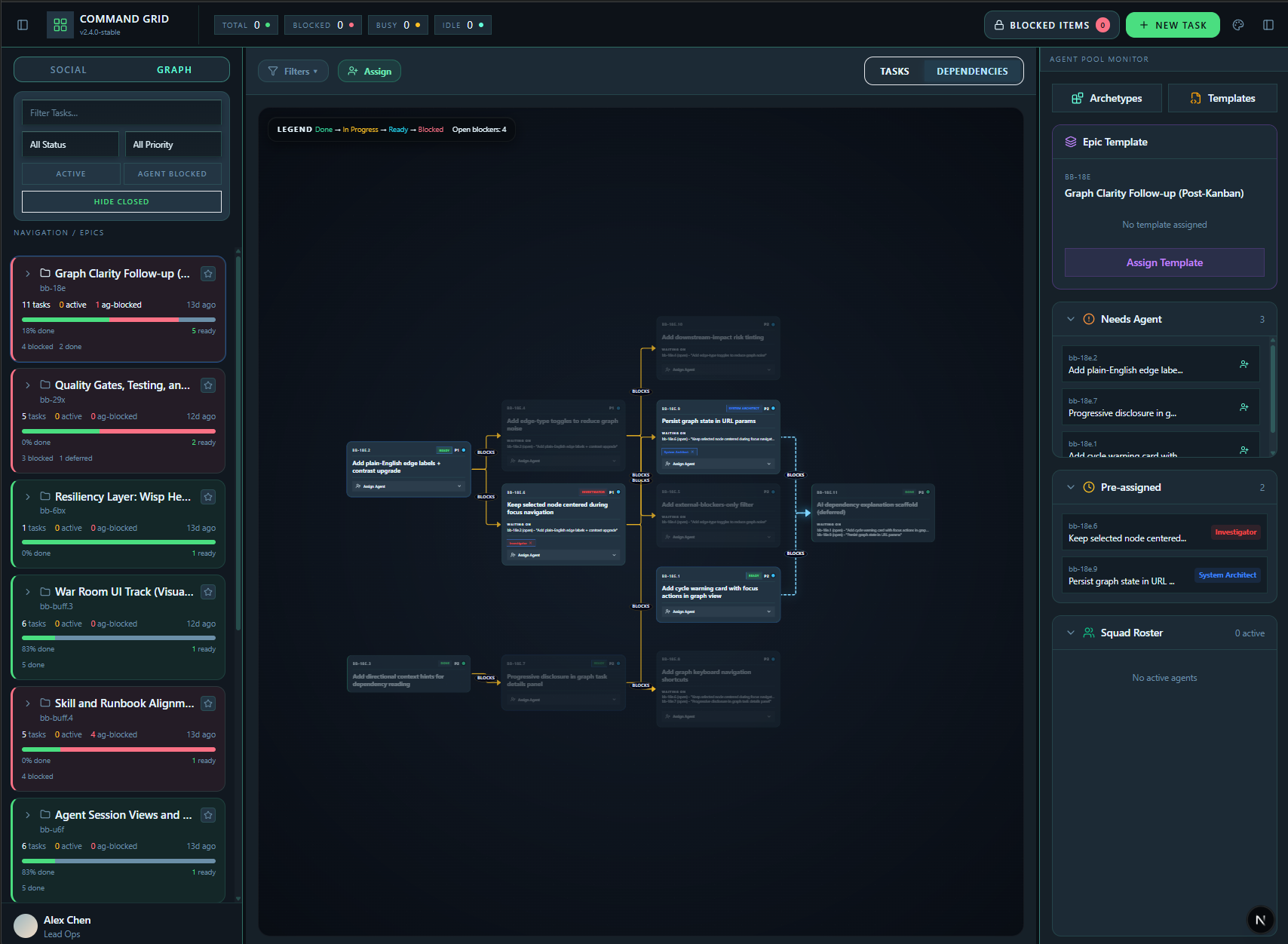
📊 DAG Graph Visualization
DAG-oriented workspace for execution decisions:
- Task and dependency tab modes for different planning lenses
- Blocked chains highlighted, assignees on nodes
- Cycle detection and blocked-chain identification
👥 Swarm Coordination
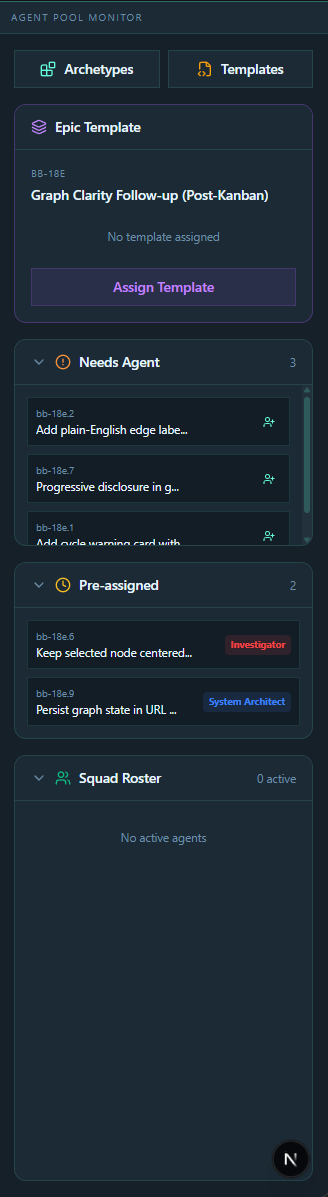
Agent pool monitor with:
- Archetypes — typed agent roles (architect, engineer, reviewer, tester, investigator, shipper)
- Templates — preset team compositions (
feature-dev,bug-fix,full-squad,greenfield,research-and-discovery) - "Needs Agent" queue for unassigned work
- Pre-assigned queue and squad roster
📡 Realtime Operations
- Live updates via Chokidar file watchers + Server-Sent Events
- Activity stream with session/task context
- Agent heartbeat and liveness tracking (active → stale → evicted)
🌐 Multi-Project Scope
- Project registry with scanner-backed discovery
- Single-project and aggregate modes
- Runtime scope switching without leaving the workspace
🤖 bb-pi Orchestrator
🚧 Under active construction. The orchestrator works but has known issues being fixed. Use your own coding agent alongside BeadBoard for now, or help us improve it!
bb-pi is BeadBoard's embedded execution runtime, built on Pi (@mariozechner/pi-coding-agent). It runs a long-lived orchestrator per project that spawns typed worker agents, tracks their bead claims, and streams a live transcript.
Working today (Phases 1-3):
- Embedded orchestrator with BeadBoard-aware tools (
bb_spawn_worker,bb_worker_status,bb_create,bb_close, etc.) - Worker spawning with numbered display names (Engineer 01, Engineer 02...)
- Capability-gated agent types — architects/reviewers get read-only tools, engineers/testers get full code edit/write/bash
- Template-based team spawning via
bb_spawn_team— spin up a full squad from a preset - Bead-required workflow — every worker claims a bead, posts progress, closes with evidence
- Async coordination — non-blocking spawn with status polling and result reads
- Chat-style orchestrator transcript with realtime telemetry
- Interactive orchestrator REPL via
bb daemon tui
Known issues being fixed:
- Double-reply rendering in orchestrator chat
- Silent failures — errors not yet surfaced to UI
- Session race condition under rapid use
Phases 4-7 (launch-anywhere UX, agent presence in views, hardening, full test coverage) are on the roadmap. See docs/plans/2026-03-05-embedded-pi-roadmap.md.
🏗️ Architecture
┌─────────────────────────────────────────────────────────────┐
│                      BeadBoard UI                           │
│  ┌──────────┐  ┌──────────┐  ┌──────────┐  ┌──────────┐    │
│  │  Social  │  │  Graph   │  │ Activity │  │  Swarm   │    │
│  │  View    │  │  View    │  │  View    │  │  Panel   │    │
│  └──────────┘  └──────────┘  └──────────┘  └──────────┘    │
└─────────────────────────────────────────────────────────────┘
         │              │              │              │
    ┌────▼──────────────▼──────────────▼──────────────▼────┐
    │                  bb CLI / bb-pi runtime               │
    │  agent register · agent send · daemon tui · spawn     │
    └──────────────────────────┬───────────────────────────┘
                               │
              ┌────────────────┼────────────────┐
              │                │                │
        ┌─────▼─────┐  ┌──────▼──────┐  ┌──────▼──────┐
        │    SSE     │  │    Dolt     │  │  Chokidar   │
        │   Events   │  │  (SQL DB)   │  │  Watchers   │
        └───────────┘  └─────────────┘  └─────────────┘
              │                │                │
              └────────────────┼────────────────┘
                               │
                        ┌──────▼──────┐
                        │     bd      │
                        │ (Beads CLI) │
                        └─────────────┘
Tech Stack
| Layer | Technologies |
|---|---|
| Frontend | Next.js 15 (App Router), React 19, TypeScript (strict) |
| Styling | Tailwind CSS, Radix UI, Framer Motion |
| Graph | @xyflow/react, Dagre |
| Database | Dolt (version-controlled SQL) |
| Realtime | Chokidar watchers, Server-Sent Events |
| Agent Runtime | @mariozechner/pi-coding-agent (bb-pi) |
Data Flow
- Write path:
bdcommands write to.beads/issues.jsonland Dolt DB - Read path: UI queries Dolt SQL (falls back to JSONL when Dolt is unavailable)
- Realtime:
bdtouches.beads/last-touched→ Chokidar fires → SSE event → UI update
Key Concepts
| Component | Purpose |
|---|---|
bd |
Beads CLI — task and dependency management |
bb / beadboard |
BeadBoard CLI — dashboard, orchestrator host, agent commands |
bb-pi |
Embedded Pi execution runtime (under construction) |
beadboard-driver |
Agent skill — operating contract for coordination |
🌍 Platform Support
Runs on macOS, Linux, and Windows.
- macOS / Linux:
bash ./install/install.shinstalls shims to~/.beadboard/bin - Windows: Path handling canonicalizes drive letter casing and backslash normalization. Mixed WSL2 + Windows setups require mirrored networking.
📁 Project Structure
beadboard/
├── src/
│   ├── app/                    # Next.js App Router pages + API routes
│   ├── components/             # UI: shared, graph, social, swarm, agents, sessions
│   ├── hooks/                  # React hooks (subscriptions, URL state, etc.)
│   ├── lib/                    # Core domain logic (parser, types, mail, registry, etc.)
│   └── tui/                    # Orchestrator TUI + agent tools
├── skills/
│   └── beadboard-driver/       # Agent skill package (runbook + scripts + tests)
├── install/                    # Platform install scripts
├── docs/                       # PRDs, roadmaps, ADRs, screenshots
└── tests/                      # Test suite (explicitly enumerated in package.json)
🛠️ Scripts
npm run dev          # Development server (localhost:3000)
npm run build        # Production build
npm run start        # Production server
npm run typecheck    # TypeScript validation (tsc --noEmit)
npm run lint         # ESLint
npm run test         # Full test suite
New test files must be added to the
testscript inpackage.json— the suite is explicitly enumerated, not auto-discovered.
🤝 Contributing
We welcome contributions from humans and AI agents. See CONTRIBUTING.md for the full guide.
Quick version:
- Find work: check GitHub Issues or run
bd list --label contrib:open - Small PRs preferred (under ~100 lines). For larger changes, open an issue first.
- Run the gates:
npm run typecheck && npm run lint && npm run test - PR against
main
Join the Discussion to coordinate on contributions, get help, or discuss ideas.
📄 License
🙏 Acknowledgments
Built on Beads by Steve Yegge, inspired by Gastown. The bb-pi execution runtime uses Pi by @mariozechner.