 a28caeb461
- Move screenshots from root to docs/screenshots/
- Remove build artifacts (eslint-report.json, tsconfig.tsbuildinfo, out/)
- Remove temporary test files from root (test-sse.mjs, test-watcher.ts)
- Remove tmp/ directory
- Update .gitignore with comprehensive patterns:
  - Build artifacts (eslint-report.json, tsconfig.tsbuildinfo, out/)
  - Temporary files (tmp/, test-*.mjs, test-*.ts, *.tmp, *.temp)
  - Root image files (should be in docs/screenshots/)
  - AI tool directories (.augment/, .claude/, .cline/, .openhands/, .qodo/, .gemini/, .kilocode/)
- Update README image references to new locations

This cleanup makes the repository structure more professional and organized.
15 KiB
⚡WORK IN PROGRESS⚡
BeadBoard




Multi-agent swarm coordination system for dependency-constrained work.
Built on Beads and inspired by Gastown.
🚀 Add BeadBoard to Your Agent
npx skills add zenchantlive/beadboard --skill beadboard-driver
This one command installs the BeadBoard driver skill, enabling your AI agents to:
- Coordinate work through dependency-constrained task graphs
- Communicate with other agents via structured message passing
- Track progress with real-time updates and activity streams
- Manage work state through the
bdCLI
Installation
Prerequisites
- Node.js 18.18+ (Node 20 LTS recommended)
- npm 7.0+
- Git (for cloning and version control)
Install from Source
BeadBoard is currently installed by cloning the repository and installing locally:
# Clone the repository
git clone https://github.com/zenchantlive/beadboard.git
cd beadboard

# Install globally (makes `beadboard` and `bd` commands available)
npm install -g .
This installs:
beadboard- Dashboard launcherbd- Beads CLI for task management
Verify Installation
beadboard --version
bd --version
Development Setup
For development or contributing:
git clone https://github.com/zenchantlive/beadboard.git
cd beadboard
npm install
npm run dev
Update Installation
cd beadboard
git pull origin main
npm install -g .
Quick Start
Start the Dashboard
# Start with Dolt backend (recommended)
beadboard start --dolt

# Or start without Dolt (limited features)
beadboard start
Open http://localhost:3000 to access the coordination dashboard.
Initialize a Project
# Create a new project
mkdir my-project
cd my-project
bd init

# Create your first task
bd create --title "My first task" --type task --priority 0
For AI Agents
Add BeadBoard to Your Agent
npx skills add zenchantlive/beadboard --skill beadboard-driver
This command installs the BeadBoard driver skill, enabling your AI agents to:
- Coordinate work through dependency-constrained task graphs
- Communicate with other agents via structured message passing
- Track progress with real-time updates and activity streams
- Manage work state through the
bdCLI
→ Full Agent Integration Guide
Quick Start
For Human Users
npm install -g beadboard
beadboard start
Open http://localhost:3000 to access the coordination dashboard.
For Agent Developers
# Install the skill to your project
npx skills add zenchantlive/beadboard --skill beadboard-driver

# Or install globally for all your projects
npx skills add zenchantlive/beadboard --skill beadboard-driver --global
Then add to your project's AGENTS.md:
## BeadBoard Integration

- Working directory: Run all `bd` commands from project root
- Source of truth: `bd` CLI manages all work state
- Evidence required: Never claim done without verification gates
Open http://localhost:3000 to access the dashboard.
Agent Integration
BeadBoard is designed for AI agent coordination. Agents work in their own project repositories while humans observe and coordinate through the BeadBoard UI.
Configuration
Add the following to your project's AGENTS.md or CLAUDE.md:
## BeadBoard Integration

- Install driver: `npx skills add zenchantlive/beadboard --skill beadboard-driver`
- Working directory: run all `bd` commands from project root
- Source of truth: `bd` CLI manages all work state
- Evidence required: never claim done without running verification gates
Key Concepts
| Component | Purpose |
|---|---|
bd |
Beads CLI - task and dependency management |
bb |
BeadBoard CLI - dashboard launcher |
beadboard-driver skill |
Agent operating contract for coordination |
See skills/beadboard-driver/SKILL.md for the complete agent runbook.
What BeadBoard Does
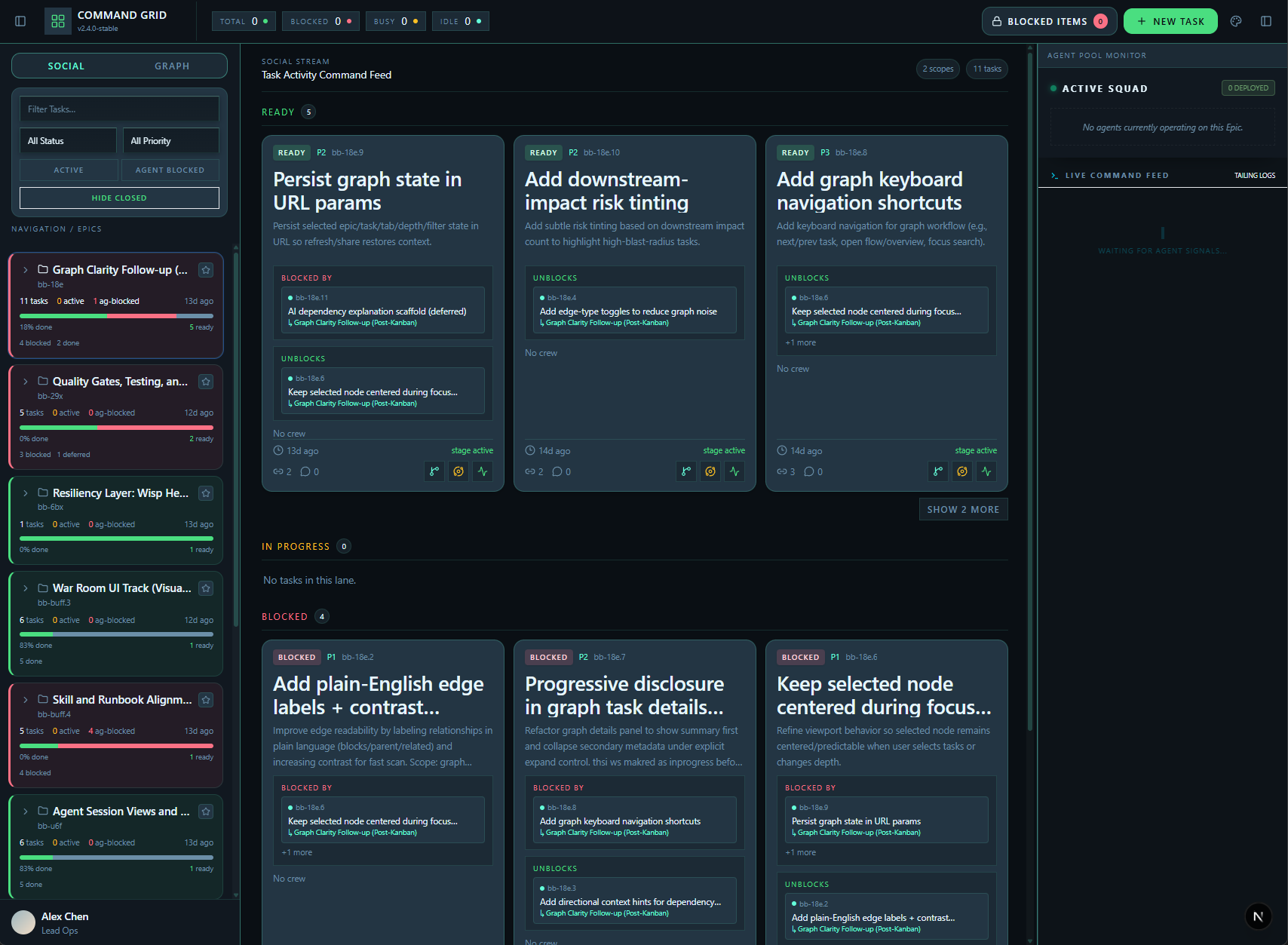
BeadBoard is an execution system for coordinating agents around shared Beads workflows:
- Agent-to-agent communication with explicit categories (
HANDOFF,BLOCKED,DECISION,INFO) - Conversation threads merged from activity events, agent messages, and local interactions
- Graph/topology context for deciding what should move next
- Global project scope switching across single and aggregate workspaces
- Swarm orchestration with archetypes/templates and assignment controls
Core Features
1. Agent Communication System
Structured message lifecycle for inter-agent coordination:
- Message states:
unread,read,acked - Required acknowledgment for high-signal categories (
HANDOFF,BLOCKED) - Per-task threads combining activity events, agent mail, and local interactions
bd mail inbox
bd mail send --to <agent> --bead <id> --category HANDOFF --subject "Ready for review"
bd mail ack <message-id>
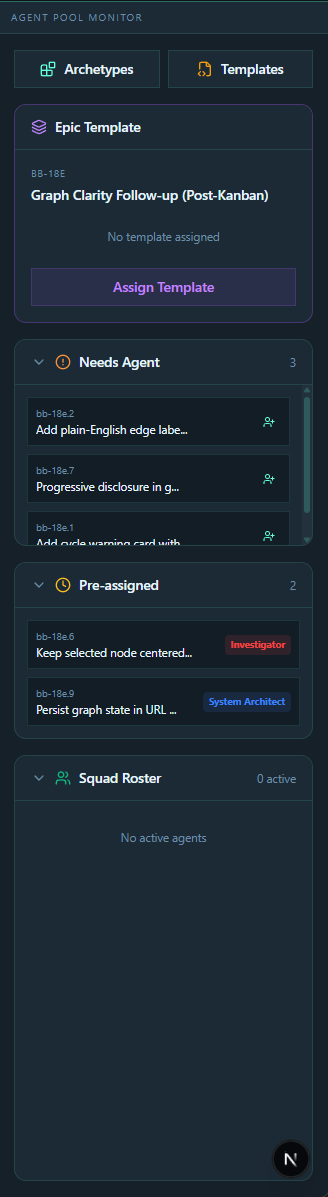
2. Swarm Coordination Surface
Agent Pool Monitor with:
- Archetypes and templates for agent specialization
- "Needs Agent" queue for unassigned work
- Pre-assigned queue for reserved tasks
- Squad roster for active team members
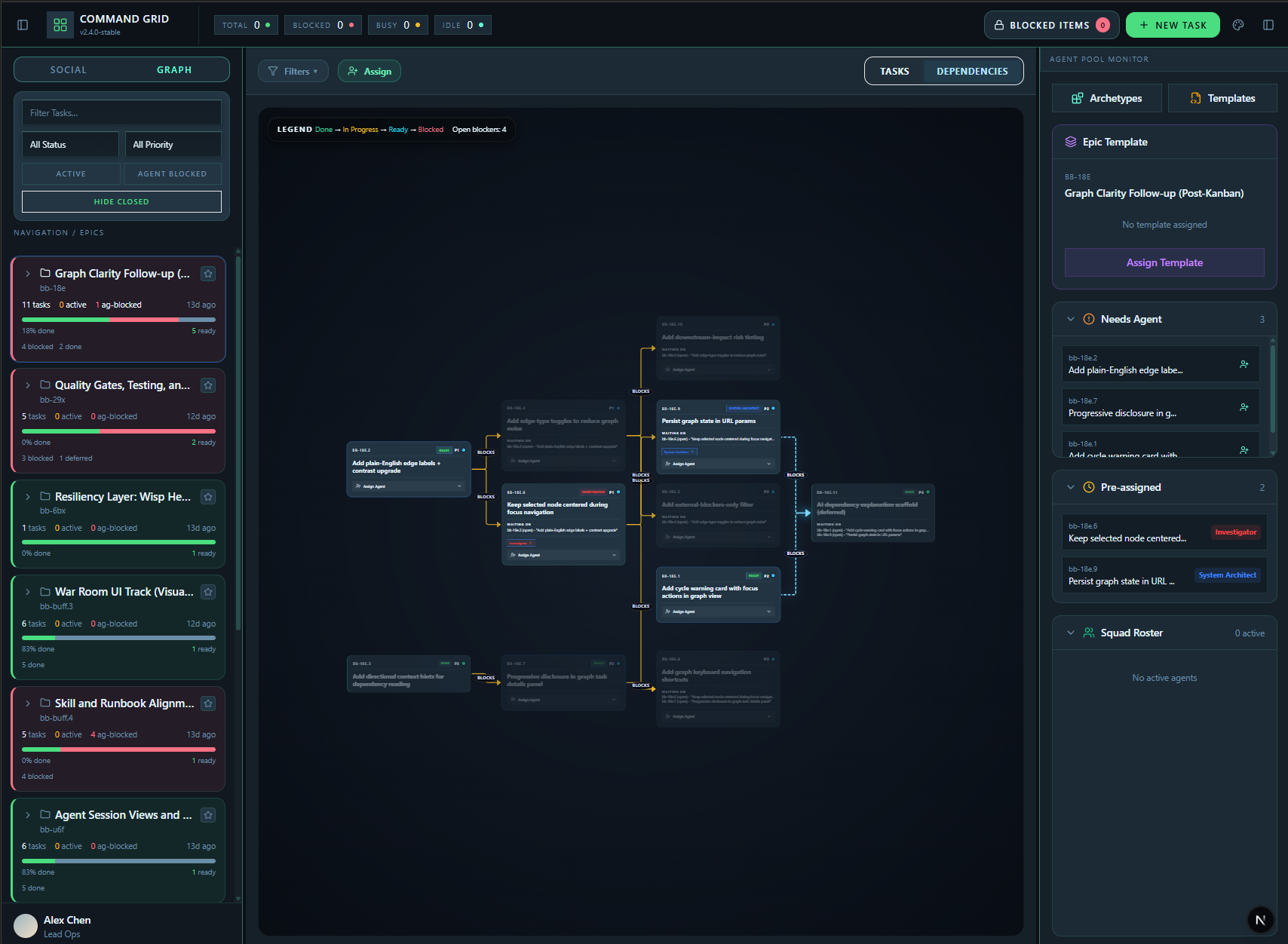
3. Graph + Dependency Topology
DAG-oriented workspace for execution decisions:
- Task/dependency tab modes for different planning lenses
- Blocker/unblock context surfaced in task cards
- Graph analysis support (cycle detection, blocked-chain identification)
4. Global Project Scope + Scanner
- Project registry and scanner-backed discovery
- Single-project and aggregate modes
- Runtime scope switching without leaving the workspace
5. Realtime Operations Layer
- Live updates via file watchers + Server-Sent Events
- Activity stream integration with session/task context
- Mutation/writeback feedback integrated into the operational surface
Installation & Setup
Prerequisites
- Node.js
18.18+(Node20 LTSrecommended) - npm
Clone + Install
git clone https://github.com/zenchantlive/beadboard.git
cd beadboard
npm install
Global CLI Install
npm install -g beadboard
Alternative: Platform-specific wrappers
POSIX (Linux/macOS):
bash ./install/install.sh
Windows (PowerShell):
powershell -ExecutionPolicy Bypass -File .\install\install.ps1
Both wrappers install shims at:
~/.beadboard/bin/bb~/.beadboard/bin/beadboard
Runtime home:
~/.beadboard/runtime/<version>~/.beadboard/runtime/current.json
Development Setup
npm run dev
Production Deployment
npm run build
npm run start
Usage & Examples
CLI Commands
# Start BeadBoard dashboard
beadboard start

# Start with Dolt database
beadboard start --dolt

# Open dashboard in browser
beadboard open

# Check status
beadboard status
Workflow Example
# 1. Navigate to your project
cd ~/my-project

# 2. Start Dolt (if using version-controlled data)
bd dolt start

# 3. Start BeadBoard
beadboard start --dolt

# 4. Open dashboard
beadboard open
Common Patterns
Coordinate through Graph + Pool:
Open /?view=graph → inspect dependency topology → drive assignment from pool panel
Communicate in Context:
Open task thread → read merged conversation → process message acknowledgments
Switch Scope:
Use registry/scanner controls → move between local and aggregate project scope
Track Live Signal:
Use social/activity views → monitor execution movement and operational events
Architecture
High-Level Design
┌─────────────────────────────────────────────────────────────┐
│                      BeadBoard UI                           │
│  ┌──────────┐  ┌──────────┐  ┌──────────┐  ┌──────────┐    │
│  │  Social  │  │  Graph   │  │ Activity │  │  Swarm   │    │
│  │  View    │  │  View    │  │  View    │  │  Panel   │    │
│  └──────────┘  └──────────┘  └──────────┘  └──────────┘    │
└─────────────────────────────────────────────────────────────┘
                           │
              ┌────────────┼────────────┐
              │            │            │
        ┌─────▼─────┐ ┌────▼────┐ ┌────▼─────┐
        │   SSE     │ │  Dolt   │ │  Watchers│
        │  Events   │ │   DB    │ │ (Chokidar)│
        └───────────┘ └─────────┘ └──────────┘
              │            │            │
              └────────────┼────────────┘
                           │
                    ┌──────▼──────┐
                    │     bd      │
                    │  (Beads CLI)│
                    └─────────────┘
Tech Stack
| Layer | Technologies |
|---|---|
| Frontend | Next.js 15, React 19, TypeScript |
| Styling | Tailwind CSS, Radix UI, Framer Motion |
| Graph | XYFlow, Dagre |
| Database | Dolt (version-controlled SQL) |
| Realtime | Chokidar watchers, Server-Sent Events |
| Validation | Zod schemas, strict TypeScript |
Data Flow
- Write Path:
bdcommands write to.beads/issues.jsonland Dolt DB - Read Path: UI queries Dolt SQL server (falls back to JSONL if unreachable)
- Realtime:
bdtouches.beads/last-touched→ Chokidar fires → SSE event → UI update
Runtime Artifacts
| Directory | Purpose | Git Status |
|---|---|---|
.beads/ |
Beads database, issues, coordination state | gitignored |
.agents/ |
Agent skills and configuration | gitignored |
Project Structure
beadboard/
├── src/
│   ├── app/
│   │   ├── page.tsx              # Active runtime route
│   │   └── api/                  # Runtime API routes
│   ├── components/
│   │   ├── shared/               # Reusable UI components
│   │   ├── graph/                # Dependency graph components
│   │   ├── social/               # Social/activity views
│   │   ├── swarm/                # Swarm coordination panel
│   │   └── sessions/             # Agent session components
│   ├── hooks/                    # React hooks
│   └── lib/                      # Core domain logic
├── skills/
│   └── beadboard-driver/         # Agent skill package
├── install/                      # Platform install scripts
├── reference/
│   └── routes/                   # Archived route implementations
├── docs/                         # Documentation
└── tests/                        # Test suite
Key Files
| File | Purpose |
|---|---|
src/app/page.tsx |
Main dashboard entry point |
src/lib/ |
Core domain: Beads model, graph builders, coordination |
skills/beadboard-driver/SKILL.md |
Agent operating contract |
AGENTS.md |
Agent operating manual for this repo |
next.config.ts |
Route redirects and Next.js config |
Routes
Active Route
/- Main dashboard (query-driven)
View Modes
| URL | View |
|---|---|
/?view=social |
Agent social feed |
/?view=graph |
Dependency graph |
/?view=activity |
Activity timeline |
Compatibility Redirects
| Old Route | Redirects To |
|---|---|
/graph |
/?view=graph |
/sessions |
/?view=social |
/timeline |
/?view=activity |
/mockup |
/ |
Contributing
Development Workflow
- Fork the repository
- Create a feature branch:
git checkout -b feature/my-feature - Make changes following existing patterns
- Run quality gates:
npm run typecheck
npm run lint
npm run test
- Submit a pull request
Code Guidelines
- Keep active runtime pages minimal in
src/app - Promote reusable logic to
src/lib,src/components,src/hooks - Archive experimental routes in
reference/routes - Follow existing TypeScript and React patterns
- Add tests for new functionality
Code of Conduct
- Be respectful and inclusive
- Focus on constructive feedback
- Support newcomers to the project
Scripts
npm run dev          # Development server
npm run build        # Production build
npm run start        # Production server
npm run typecheck    # TypeScript validation
npm run lint         # ESLint
npm run test         # Test suite
npm run video        # Remotion video preview
npm run video:render # Render video
Changelog
v0.1.0 (Current)
- Initial release
- Multi-agent coordination system
- Graph-based dependency visualization
- Real-time updates via SSE
- Agent mail and communication system
- Swarm coordination panel
- Global project scope switching
Roadmap
- Cross-view assignment controls in all major views
- Enhanced swarm UX and terminology
- Expanded global project configuration workflows
- Witness enforcement layer for agent liveness
- Additional graph analysis features
License
Acknowledgments
Built on Beads and inspired by Gastown. Thanks Steve Yegge!