
130 lines
3.8 KiB
Markdown
130 lines
3.8 KiB
Markdown
#Vim htmldjango autocomplete
|
|
|
|
[](https://gitter.im/mjbrownie/vim-htmldjango_omnicomplete?utm_source=badge&utm_medium=badge&utm_campaign=pr-badge&utm_content=badge)
|
|
|
|
An omnicomplete tailored to django templates "tags/variables/filters/templates"
|
|
|
|
Repo: git://github.com/mjbrownie/vim-htmldjango_omnicomplete.git
|
|
|
|
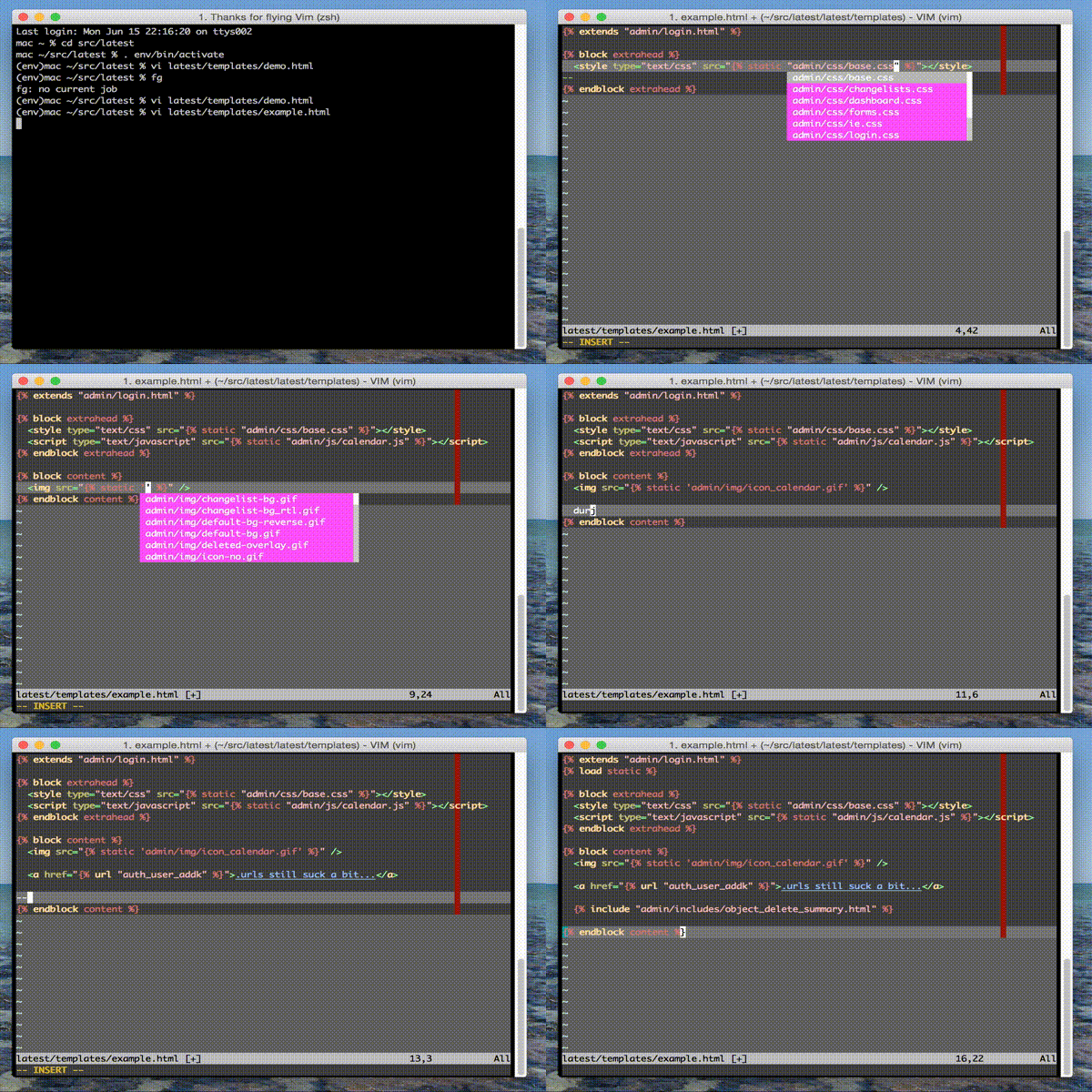
##Screenshots:
|
|
|
|
|
|
( Note the screenshot is from the youcompleteme rewrite found here https://github.com/mjbrownie/django_completeme).
|
|
This plugin is standalone and functionally identical except for the fuzzy ycm completion options. See notes at the bottom.
|
|
|
|
##Eg.
|
|
|
|
1. Filters
|
|
|
|
{{ somevar|a<c-x><c-o>}} should complete 'add' , 'addslashes'
|
|
|
|
2. Tags
|
|
|
|
{% cy<c-x><x-o> %} should complete 'cycle'
|
|
|
|
3. Load statements
|
|
|
|
It also should grab any libs you have {% load tag_lib %} in the file.
|
|
Although it needs them in INSTALLED_APPS.
|
|
|
|
{% load <c-x><c-o> %} will complete libraries (eg. 'cache', 'humanize')
|
|
|
|
4. template filenames
|
|
|
|
{% extends '<c-x><c-o>' %} will list base.html ... etc
|
|
|
|
5. url complete
|
|
|
|
{% url <c-x><c-o> %} should complete views and named urls
|
|
|
|
6. super block complete
|
|
|
|
eg {% block c<c-x><c-o> %} to complete 'content' or something defined
|
|
in an extended template.
|
|
|
|
7. static files complete
|
|
|
|
eg {% static "r<c-x><c-o>" %}
|
|
|
|
<script src="{% static "<c-x><c-o>" %}" /> - completes js files in static
|
|
<style src="{% static "<c-x><c-o>" %}" /> - completes css files in static
|
|
<img src="{% static "<c-x><c-o>" %}" /> - completes img files in static
|
|
|
|
8. optional variable name completion (placeholder)
|
|
|
|
{{ s<c-x><x-o> }}
|
|
|
|
will complete any maps defined in the python htmldjango_opts['variable']
|
|
dict list. See below for info.
|
|
|
|
|
|
Where possible info panels show the functions __doc__. Most of the
|
|
internal ones are decent.
|
|
|
|
##Requires:
|
|
|
|
+python
|
|
|
|
##SETUP
|
|
|
|
1. I like pathogen/Vundle clone into ~/.vim/bundle directory.
|
|
|
|
Alternately just stick the vim file in your ~/.vim/autoload/ dir.
|
|
|
|
2. in .vimrc set the omnifunc Eg.
|
|
|
|
au FileType htmldjango set omnifunc=htmldjangocomplete#CompleteDjango
|
|
|
|
3. Optional: At the moment you need to force a html flavour for htmlcompletion
|
|
|
|
in .vimrc
|
|
|
|
let g:htmldjangocomplete_html_flavour = 'html401s'
|
|
|
|
:verbose function htmlcomplete#CheckDoctype for DocType details
|
|
|
|
Choices:
|
|
'html401t' 'xhtml10s' 'html32' 'html40t' 'html40f' 'html40s'
|
|
'html401t' 'html401f' 'html401s' 'xhtml10t' 'xhtml10f' 'xhtml10s'
|
|
'xhtml11'
|
|
|
|
'html5' if you have html5.vim
|
|
|
|
4. matchpair notes
|
|
|
|
This plugin uses matchpair and needs to be inside a closed django tag.
|
|
This is fine if you are using snipmate. Also you might want auto
|
|
closing maps such as follows.
|
|
|
|
au FileType htmldjango inoremap {% {% %}<left><left><left>
|
|
au FileType htmldjango inoremap {{ {{ }}<left><left><left>
|
|
|
|
##TESTING
|
|
|
|
django needs to be in sys.path along with DJANGO_SETTINGS_MODULE in your
|
|
environment.
|
|
|
|
To test...
|
|
|
|
:python import django
|
|
|
|
should not result in an error
|
|
|
|
:python from django.conf import settings; print settings.INSTALLED_APPS
|
|
:python from django.conf import settings; print settings.TEMPLATE_DIRS
|
|
|
|
should show the apps template dirs you need
|
|
|
|
I've only tested this on a mac with vim 7.3 and django 1.4
|
|
|
|
##NOTES
|
|
|
|
Note I have started rewriting an editior agnostic version of this plugin.
|
|
|
|
https://github.com/mjbrownie/django_completeme
|
|
|
|
It can be used with my fork of the youcompleteme daemon.
|
|
|
|
https://github.com/mjbrownie/ycmd
|
|
|
|
but it is still pre alpha.
|