
142 lines
3.6 KiB
Markdown
142 lines
3.6 KiB
Markdown
Syntax Highlighting and Indentation for Haskell and Cabal
|
|
=========================================================
|
|
|
|
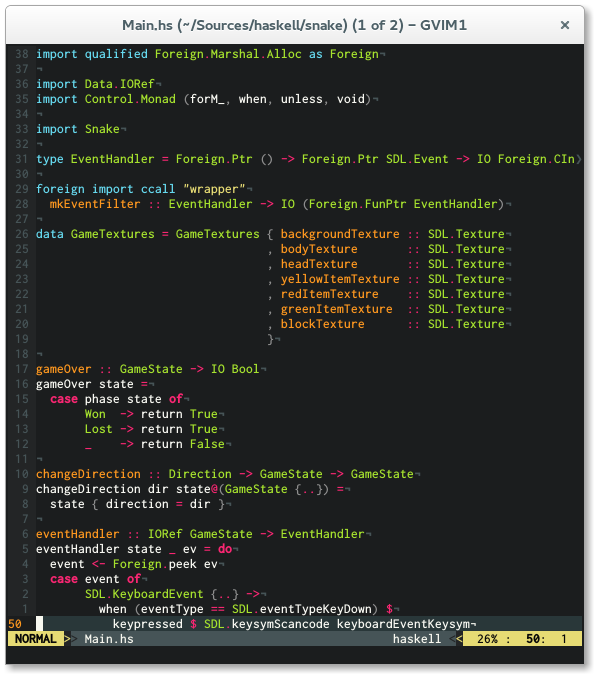
I was unhappy with the Haskell scripts that are
|
|
shipped with vim, therefore I decided to make my
|
|
own based on [idris-vim][].
|
|
|
|
I hope you find this useful.
|
|
|
|
|
|
|
|
## Features
|
|
|
|
* Covers a broader spectrum of keywords
|
|
* Highlighting for new features like type families, pattern synonyms, arrow syntax, recursive do, role annotations, QuasiQuotation
|
|
* More contextual highlighting (e.g. highlight 'as' or 'family' only in appropriate places)
|
|
* Smarter indentation
|
|
* Better Cabal support
|
|
|
|
## Installation
|
|
|
|
I recommend using [Pathogen][] for installation. Simply clone
|
|
this repo into your `~/.vim/bundle` directory and you are ready to go.
|
|
|
|
cd ~/.vim/bundle
|
|
git clone https://github.com/neovimhaskell/haskell-vim.git
|
|
|
|
Be sure that the following lines are in your
|
|
`.vimrc`
|
|
|
|
|
|
syntax on
|
|
filetype plugin indent on
|
|
|
|
### Manual Installation
|
|
|
|
Copy content into your `~/.vim` directory.
|
|
|
|
## Configuration
|
|
|
|
### Features
|
|
|
|
To enable the features you would like to use, just add the according line to your
|
|
`.vimrc`.
|
|
|
|
```viml
|
|
let g:haskell_enable_quantification = 1 " to enable highlighting of `forall`
|
|
let g:haskell_enable_recursivedo = 1 " to enable highlighting of `mdo` and `rec`
|
|
let g:haskell_enable_arrowsyntax = 1 " to enable highlighting of `proc`
|
|
let g:haskell_enable_pattern_synonyms = 1 " to enable highlighting of `pattern`
|
|
let g:haskell_enable_typeroles = 1 " to enable highlighting of type roles
|
|
let g:haskell_enable_static_pointers = 1 " to enable highlighting of `static`
|
|
let g:haskell_backpack = 1 " to enable highlighting of backpack keywords
|
|
```
|
|
|
|
### Highlighting
|
|
|
|
`haskell-vim` has an opinionated highlighting. If you do not like that you can switch to
|
|
a more traditional mode by setting `g:haskell_classic_highlighting` to `1`.
|
|
|
|
Disabling Template Haskell and Quasiquoting syntax is possible by setting
|
|
`g:haskell_disable_TH` to `1`.
|
|
|
|
### Indentation
|
|
|
|
To configure indentation in `haskell-vim` you can use the following variables to change indentation depth, just add the according line to your `.vimrc`.
|
|
|
|
If you dislike how indentation works you can disable it by setting `g:haskell_indent_disable` to
|
|
`1`.
|
|
|
|
Additionally you can use the
|
|
[vim-hindent](https://github.com/alx741/vim-hindent) plugin to achieve automatic
|
|
indentation using *hindent*.
|
|
|
|
#### Haskell
|
|
|
|
* `let g:haskell_indent_if = 3`
|
|
|
|
if bool
|
|
>>>then ...
|
|
>>>else ...
|
|
|
|
* `let g:haskell_indent_case = 2`
|
|
|
|
case xs of
|
|
>>[] -> ...
|
|
>>(y:ys) -> ...
|
|
|
|
* `let g:haskell_indent_let = 4`
|
|
|
|
let x = 0 in
|
|
>>>>x
|
|
|
|
* `let g:haskell_indent_where = 6`
|
|
|
|
where f :: Int -> Int
|
|
>>>>>>f x = x
|
|
|
|
* `let g:haskell_indent_before_where = 2`
|
|
|
|
foo
|
|
>>where
|
|
|
|
* `let g:haskell_indent_after_bare_where = 2`
|
|
|
|
where
|
|
>>foo
|
|
|
|
* `let g:haskell_indent_do = 3`
|
|
|
|
do x <- a
|
|
>>>y <- b
|
|
|
|
* `let g:haskell_indent_in = 1`
|
|
|
|
let x = 1
|
|
>in x
|
|
|
|
* `let g:haskell_indent_guard = 2`
|
|
|
|
f x y
|
|
>>|
|
|
|
|
`haskell-vim` also supports an alterative style for `case` indentation.
|
|
|
|
* `let g:haskell_indent_case_alternative = 1`
|
|
|
|
f xs ys = case xs of
|
|
>>[] -> ...
|
|
>>(y:ys) -> ...
|
|
|
|
|
|
#### Cabal
|
|
|
|
* `let g:cabal_indent_section = 2` (limited to max. 4 spaces)
|
|
|
|
executable name
|
|
>>main-is: Main.hs
|
|
|
|
|
|
[Pathogen]: https://github.com/tpope/vim-pathogen
|
|
[idris-vim]: https://github.com/idris-hackers/idris-vim
|